My Gigabyte RX6750XT Gaming has been crashing for no apparent reason.
Warning
I already ran DDU. Twice.
2026-05-07
I finally decided to try and investigate this shit further, so I'm making this a public post. While opening a tab in Obsidian, with no significant GPU load sans LM Studio running in the background with qwen3.5-9b-uncensored-hauhaucs-aggressive being loaded since yesterday (and I was able to play together with this model running with no issues).
It started with a hang, with 4/5 of my screen turning gray. A minute after, black screen, driver fallback and I was able to see my desktop again.
The first harbinger of doom was a window similar to this one, except it said there was a driver "timeout", and while I was filling out the report, that crashed as well and showed me this window. 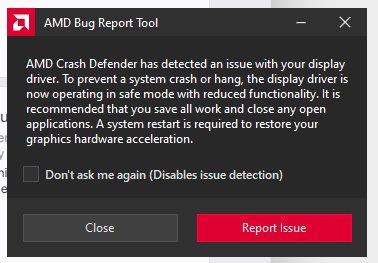
The GPU, of course, is now disabled. 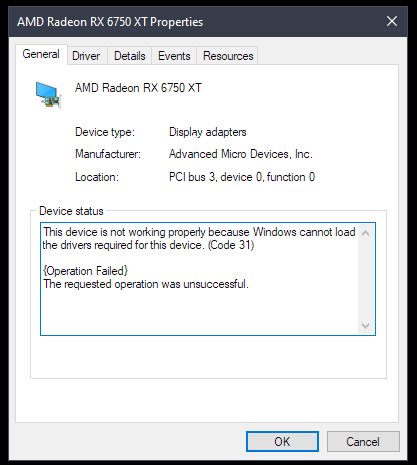
Reliability history doesn't even show the problem: 
System events however is able to shed some light 
All three warnings are identical -- Display driver amduw23g-198974-eda2a421 stopped responding and has successfully recovered. The two errors above the warnings are The iommu has detected an error., and the information item is Process C:\Windows\System32\DriverStore\FileRepository\u0198974.inf_amd64_dcac9659486b668a\B025819\atieclxx.exe (process ID:2984) reset policy scheme from {8c5e7fda-e8bf-4a96-9a85-a6e23a8c635c} to {8c5e7fda-e8bf-4a96-9a85-a6e23a8c635c}
I've decided to filter the logs by (?i)amd.*|D3D.*|Direct3D.*: 
These are the messages:
Display driver amduw23g-198974-eda2a421 stopped responding and has successfully recovered.
Display driver amduw23g-198974-eda2a421 stopped responding and has successfully recovered.
Display driver amduw23g-198974-eda2a421 stopped responding and has successfully recovered.
Display driver amduw23g-195698-fece65a5 stopped responding and has successfully recovered.
Display driver amduw23g-195698-fece65a5 stopped responding and has successfully recovered.
Display driver amduw23g-195698-fece65a5 stopped responding and has successfully recovered.
Display driver amduw23g-198281-bc502516 stopped responding and has successfully recovered.
Display driver amduw23g-198281-bc502516 stopped responding and has successfully recovered.
Display driver amduw23g-198281-bc502516 stopped responding and has successfully recovered.
Display driver amduw23g-198281-bc502516 stopped responding and has successfully recovered.
Display driver amduw23g-198281-bc502516 stopped responding and has successfully recovered.
Display driver amduw23g-198281-bc502516 stopped responding and has successfully recovered.
Display driver amduw23g-197639-19a81ed0 stopped responding and has successfully recovered.
Display driver amduw23g-197639-19a81ed0 stopped responding and has successfully recovered.
Display driver amduw23g-197639-19a81ed0 stopped responding and has successfully recovered.
Display driver amduw23g-197639-19a81ed0 stopped responding and has successfully recovered.
Display driver amduw23g-197639-19a81ed0 stopped responding and has successfully recovered.
Display driver amduw23g-196283-af4b12f4 stopped responding and has successfully recovered.
Display driver amduw23g-196283-af4b12f4 stopped responding and has successfully recovered.
Display driver amduw23g-196283-af4b12f4 stopped responding and has successfully recovered.
As you can see, driver updates did happen, but the messages are the same otherwise.
An attempt to disable and re-enable the device via Device Manager results in the same iommu error: 